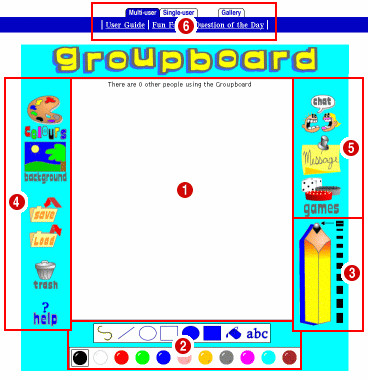
| Whiteboard |
| | Press the mouse button to draw on this. |
| |
 | Drawing Colours |
| |
| | Pick one of these with your mouse to draw in that colour. |
 |
|
| |
| | Drawing Tools |
| |
| |  | Draws squiggly lines. |
 | For straight lines. |
 | Use for circles and ovals. |
 | Use to draw squares and rectangles. |
 | Draws solid circles and ovals. |
 | For solid squares and rectangles. |
 | Pours the chosen colour over a drawing. |
 | Places words on your drawing. |
|
| |
 | Line Size |
| | Use this to choose how thick your drawing line is. |
| |
 | Art Icons |
| |
| |  | Click to get lots more colours to draw with. |
 | Replace the white background with an image you can draw on top of. |
 | Store away your drawing into the gallery. |
 | Take an image from the gallery so you can draw on it some more. |
 | Clean the Kidsboard ready for a new drawing. |
 | Get some help (come here). |
|
| |
 | Multi-user Icons |
| |
| |  | Open the chat window to talk with friends. |
 | Display the message board window to leave messages. |
 | Want to play a game with some friends, then click on that. |
|
| |
 | Page Tabs and Useful Links |
| | Use the tabs to switch between different versions of the board:
- Click on 'Multi-User' to go to a board on which
you can draw with the other users who are logged on to your Kidsboard.
- Click on 'Single-User' to go to a version of the board where there are no
other users logged on, so you can draw by yourself.
- Click on 'Gallery' to view a list of pictures which have been saved.
|
| |
Use the links to see useful pages like this user guide. |